mirror of
https://github.com/nextcloud/nextcloudpi.git
synced 2026-01-10 15:12:01 -03:30
 298f0f2e93
Signed-off-by: Victor-ray, S <12261439+ZendaiOwl@users.noreply.github.com>
Signed-off-by: Tobias Knöppler <6317548+theCalcaholic@users.noreply.github.com>
168 lines
4.9 KiB
Markdown
168 lines
4.9 KiB
Markdown
English | [Traditional Chinese 繁體中文](i18n/README-zh_TW.md) | [Simplified Chinese 简体中文](i18n/README-zh_CN.md)
|
||
|
||
# NextcloudPi [](https://t.me/NextcloudPi) [](https://help.nextcloud.com/c/support/appliances-docker-snappy-vm) [](https://www.paypal.com/cgi-bin/webscr?cmd=_donations&business=N8PJHSEQF4G7Y&lc=US&item_name=Own%20Your%20Bits&item_number=NextcloudPi&no_note=1&no_shipping=1¤cy_code=EUR&bn=PP%2dDonationsBF%3abtn_donate_LG%2egif%3aNonHosted) [](https://ownyourbits.com)
|
||
|
||

|
||
|
||
This is the build code for [NextcloudPi](https://nextcloudpi.com).
|
||
|
||
NextcloudPi is a ready to use image for Virtual Machines, Raspberry Pi, Odroid HC1, rock64 and other boards [(⇒Downloads)](https://github.com/nextcloud/nextcloudpi/releases).
|
||
|
||
This code also generates the NextcloudPi [docker image](https://hub.docker.com/r/ownyourbits/nextcloudpi), LXD and VM, and includes an installer for any Debian based system.
|
||
|
||
Find the full documentation at [docs.nextcloudpi.com](http://docs.nextcloudpi.com)
|
||
|
||
---
|
||
|
||
[](https://github.com/nextcloud/nextcloudpi/actions/workflows/vm-tests.yml)
|
||
|
||
[](https://github.com/nextcloud/nextcloudpi/actions/workflows/build-docker.yml)
|
||
|
||
---
|
||
|
||
## Features
|
||
|
||
* Debian/Raspbian 11 Bullseye
|
||
* Nextcloud 24.0.5
|
||
* Apache 2.4.25, with HTTP2 enabled
|
||
* PHP 7.4
|
||
* MariaDB 10
|
||
* Redis memory cache
|
||
* ncp-config for easy setup ( RAM logs, USB drive and more )
|
||
* Automatic redirection to HTTPS
|
||
* ACPU PHP cache
|
||
* PHP Zend OPcache enabled with file cache
|
||
* HSTS
|
||
* Cron jobs for Nextcloud
|
||
* Sane configuration defaults
|
||
* Full emoji support
|
||
* Postfix email
|
||
* Secure
|
||
|
||
## Extras
|
||
|
||
* Setup wizard
|
||
* NextcloudPi Web Panel
|
||
* Wi-Fi ready
|
||
* Ram logs
|
||
* Automatic security updates, activated by default.
|
||
* Let’s Encrypt for trusted HTTPS certificates.
|
||
* Fail2Ban protection against brute force attacks.
|
||
* UFW firewall
|
||
* Dynamic DNS support for no-ip.org
|
||
* Dynamic DNS support for freeDNS
|
||
* Dynamic DNS support for duckDNS
|
||
* Dynamic DNS support for spDYN
|
||
* Dynamic DNS support for Namecheap
|
||
* dnsmasq DNS server with DNS cache
|
||
* ModSecurity Web Application Firewall
|
||
* NFS ready to mount your files over LAN
|
||
* SAMBA ready to share your files with Windows/Mac/Linux
|
||
* USB automount
|
||
* Remote updates
|
||
* Automatic NCP updates
|
||
* Automatic Nextcloud updates
|
||
* Update notifications
|
||
* Nextcloud backup and restore
|
||
* Nextcloud online installation
|
||
* Format USB drive to BTRFS
|
||
* BTRFS snapshots
|
||
* Automatic BTRFS snapshots
|
||
* BTRFS snapshot auto sync
|
||
* scheduled rsync
|
||
* UPnP automatic port forwarding
|
||
* Security audits with Lynis and Debsecan
|
||
* ZRAM
|
||
* SMART hard drive health monitoring
|
||
* Prometheus metrics monitoring
|
||
|
||
Extras can be activated and configured using the web interface at HTTPS port 4443
|
||
|
||

|
||
|
||
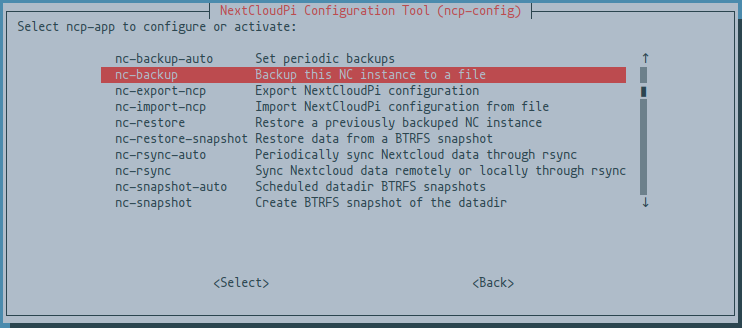
Or from the command line using
|
||
|
||
```
|
||
sudo ncp-config
|
||
```
|
||
|
||
|
||
|
||
|
||
## Run in docker
|
||
|
||
```
|
||
docker run -d -p 4443:4443 -p 443:443 -p 80:80 -v ncdata:/data --name nextcloudpi ownyourbits/nextcloudpi $DOMAIN
|
||
```
|
||
|
||
## Run in LXD
|
||
|
||
```
|
||
lxc import NextcloudPi_LXD_09-29-21.tar.bz
|
||
lxc start ncp
|
||
```
|
||
|
||
## How to build
|
||
|
||
Install:
|
||
|
||
- `git`
|
||
- `docker`
|
||
- `build-essential`
|
||
- `qemu`
|
||
- `qemu-user-static`
|
||
- `chroot`
|
||
- `jq`
|
||
- `psmisc`
|
||
- `procps`
|
||
|
||
and all the usual building tools.
|
||
|
||
```
|
||
git clone https://github.com/nextcloud/nextcloudpi.git
|
||
cd nextcloudpi
|
||
./build/build-SD-rpi.sh
|
||
```
|
||
|
||
### Armbian-based board
|
||
|
||
```
|
||
./build-SD-armbian.sh odroidxu4 # supported board code name
|
||
```
|
||
|
||
In order to generate the Docker images, you'll also need to change the username, repo and tags to match your credentials at Docker Hub.
|
||
|
||
```
|
||
git clone https://github.com/nextcloud/nextcloudpi.git
|
||
cd nextcloudpi
|
||
build/build-docker.sh x86
|
||
build/build-docker.sh armhf
|
||
build/build-docker.sh arm64
|
||
```
|
||
|
||
### LXD
|
||
|
||
```
|
||
./build/build-LXD.sh
|
||
```
|
||
|
||
NextcloudPi can be installed in any architecture running the latest Debian
|
||
|
||
_Note: this assumes a clean Debian install, and there is no rollback method_
|
||
|
||
### Curl install scripts
|
||
|
||
```
|
||
# curl -sSL https://raw.githubusercontent.com/nextcloud/nextcloudpi/master/install.sh | bash
|
||
```
|
||
|
||
## Downloads
|
||
|
||
https://nextcloudpi.com
|
||
|
||
https://hub.docker.com/r/ownyourbits/nextcloudpi
|
||
|
||
## Contact
|
||
|
||
You can find us in the [forums](https://help.nextcloud.com/c/support/appliances-docker-snappy-vm) and a [Telegram group](https://t.me/NextcloudPi)
|